The meeting recorder that turns your standup into a pull request
How Reverbic cuts the hidden dev time between “we decided” and “it shipped.”
Originally published on Medium · read it there
Most teams do not lose their dev time in the editor. They lose it in the handoff.
A product decision gets made in a standup. Someone turns it into notes. Someone else turns the notes into a ticket. An engineer opens the ticket three days later and asks what the team meant. Then the engineer explains it all again to a coding agent, adds the missing constraints, corrects the first attempt, and goes looking for the decision everyone remembers but nobody can find.
The code may take an hour. Getting the right context to the person or agent writing it can take the rest of the day.
That is the dev-time problem Reverbic is built to attack.
Reverbic treats an engineering conversation as the beginning of the build pipeline, not the end of a calendar event. It captures what the team said, distills the actionable parts into an executable spec, checks that the spec is grounded in the transcript, attaches project context, and hands the result to Claude Code, Cursor, Codex, GitHub, or any MCP-capable client.
In other words, your meeting stops being a recording you might revisit. It becomes usable input for the work.
The expensive part of software is translation
Modern coding agents are fast when the prompt is precise. They are also excellent at producing the wrong thing quickly when the prompt is vague.
“Add rate limiting” sounds actionable until someone has to answer the next ten questions. Which routes? Which algorithm? What limit? Per user or per IP? Where should state live? What response should the client receive? Which paths bypass it? What conventions does this repository already use?
Those answers often exist. The team said them out loud. The problem is that the details are trapped in a conversation while the coding agent is looking at a thin ticket.
The usual workflow creates a lossy chain:
- ·Conversation
- ·Meeting notes
- ·Ticket
- ·Engineer interpretation
- ·Agent prompt
- ·Code
Every handoff drops context. Every dropped detail creates another question, another Slack message, another agent correction, or another review cycle.
Reverbic shortens that chain:
- ·Capture the conversation
- ·Distill the decision into a structured spec
- ·Verify the spec against what was actually said
- ·Add the project’s stack, files, conventions, and constraints
- ·Send it directly to the coding surface
That is where the time comes back. Not from typing faster, but from explaining the same work fewer times.
Step 1: Capture the decision before it decays
Engineering intent is clearest while the discussion is happening. A day later, people remember the conclusion but forget the edge cases. A week later, even the conclusion can become fuzzy.
Reverbic gives teams several ways to catch the source material. You can record in the browser, use the desktop app for system-audio capture, record from iPhone or Apple Watch, import a recording, or feed in text such as notes or a Slack thread. The desktop route is especially useful for teams that do not want a bot joining the call as another participant.
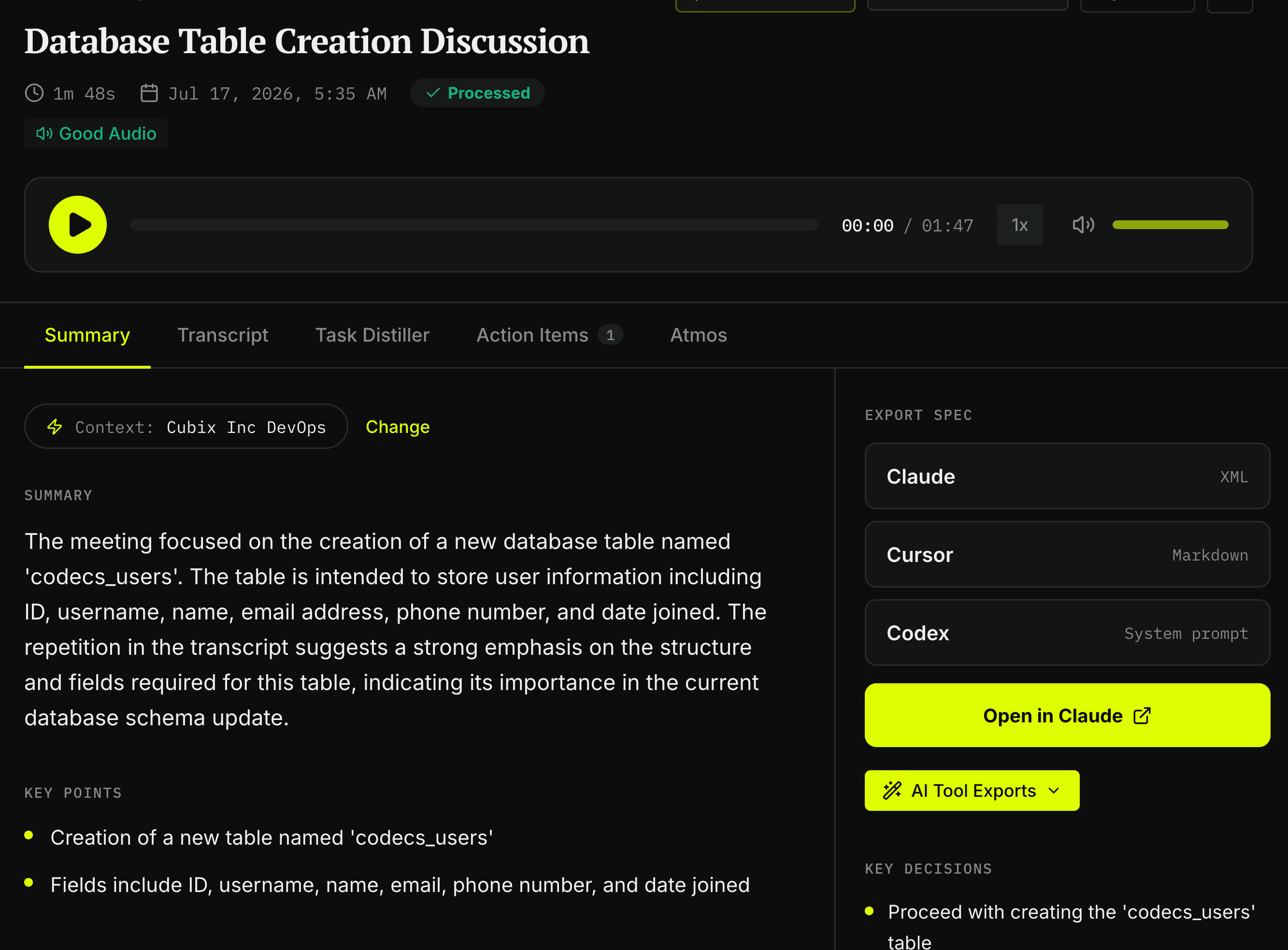
Once the recording stops, the audio pipeline prepares the file, transcribes it in chunks, and summarizes the result into the meeting record. The processed meeting keeps the transcript alongside the summary, key points, action items, and decisions.
This matters because a summary alone is not enough for development work. A summary tells you what a meeting was about. A transcript preserves the exact constraint that determines whether the implementation is correct. Reverbic keeps both.
Step 2: Turn discussion into an executable spec
The Task Distiller is the bridge between “we talked about it” and “an agent can build it.”
Instead of handing a coding agent a full transcript and hoping it finds the important part, Reverbic identifies development topics and creates a focused spec for the selected task. The output has four practical pieces:
- ·Goal: the thing that needs to be built, fixed, or changed
- ·Context: the relevant project background
- ·Requirements: the concrete behaviors and constraints
- ·Acceptance criteria: the conditions that define done
That structure is simple on purpose. It answers the questions a strong engineer would ask before touching the code.
Imagine a standup where the team decides to add rate limiting to an API gateway. During the conversation, people agree on a token bucket, 100 requests per minute per IP, Redis-backed state, a configurable TTL, a 429 response with a Retry-After header, and bypasses for health and authentication routes.
Without a clean handoff, the ticket might still end up as “Add rate limiting before launch.”
With Reverbic, those spoken constraints become the requirements and acceptance criteria. The coding agent receives the actual decision, not a vague memory of it.
Step 3: Verify before you accelerate
Turning a transcript into a spec with AI creates an obvious risk: the model can make a plausible detail sound like a decided detail.
Reverbic accounts for that with a separate verification pass. It evaluates the spec for specificity, completeness, and actionability. For meeting-backed specs, it also checks each requirement against the transcript and flags requirements that have no basis in what the team said. If a relevant technology or convention from the active project context is missing, the verification step can surface that too.
This is a critical design choice. The goal is not to produce the most impressive-looking spec. The goal is to produce a spec the team can trust enough to use. A flagged gap gives you a chance to fix the input before a coding agent turns it into a branch full of assumptions.
Speed without grounding creates rework. Grounding is what makes speed useful.
Step 4: Stop re-explaining your codebase
Even a perfect transcript only describes what the team wants. It may not describe how this repository expects the work to be done. That is what Reverbic Context Packs are for.
A Context Pack can carry the project knowledge that should follow every task: the stack, architecture, naming rules, important files, testing expectations, constraints, and instructions for the agent. Set it once, activate it for the project, and Reverbic can use it while distilling future work.
This removes one of the most repetitive parts of agent-assisted development. You no longer need to paste the same architecture paragraph into every prompt or hope someone remembers that this codebase uses a specific validation library, migration convention, server boundary, or directory structure.
For a team, this is more than convenience. It makes the handoff consistent. The same discussion is less likely to produce three different implementations depending on who happened to prompt the agent.
Step 5: Put the result where development already happens
A good spec still wastes time if it dies in another dashboard. Reverbic offers several handoff paths because developers do not all work the same way.
From the meeting view, you can export the task in formats tailored for Claude, Cursor, and Codex. Claude gets structured XML, Cursor gets Markdown, and Codex gets a system-prompt-style brief. You can copy the result or open it directly in Claude.
From the terminal, the Reverbic CLI can distill a file or piped text without breaking the workflow:
rvb distill ./standup.txt --format claude --copyThat command turns the input into a structured spec and places it on the clipboard, ready for the coding session. The CLI also supports Cursor and Codex formats, reads from standard input, and can use the active Context Pack.
For agent-native workflows, Reverbic exposes meeting knowledge through MCP. A connected client can list meetings, fetch a full meeting, search meetings, list action items, and list decisions. That means an agent can answer questions such as “What did we decide about rate limiting yesterday?” without asking a human to hunt through the transcript and paste the answer back.
This is a subtle but important shift. The meeting archive stops being a destination humans must browse. It becomes a context source the agent can query while working.
Step 6: Go from a live thought board to a reviewable PR
For work that starts as a collaborative design discussion, Reverbic Atmos pushes the workflow further.
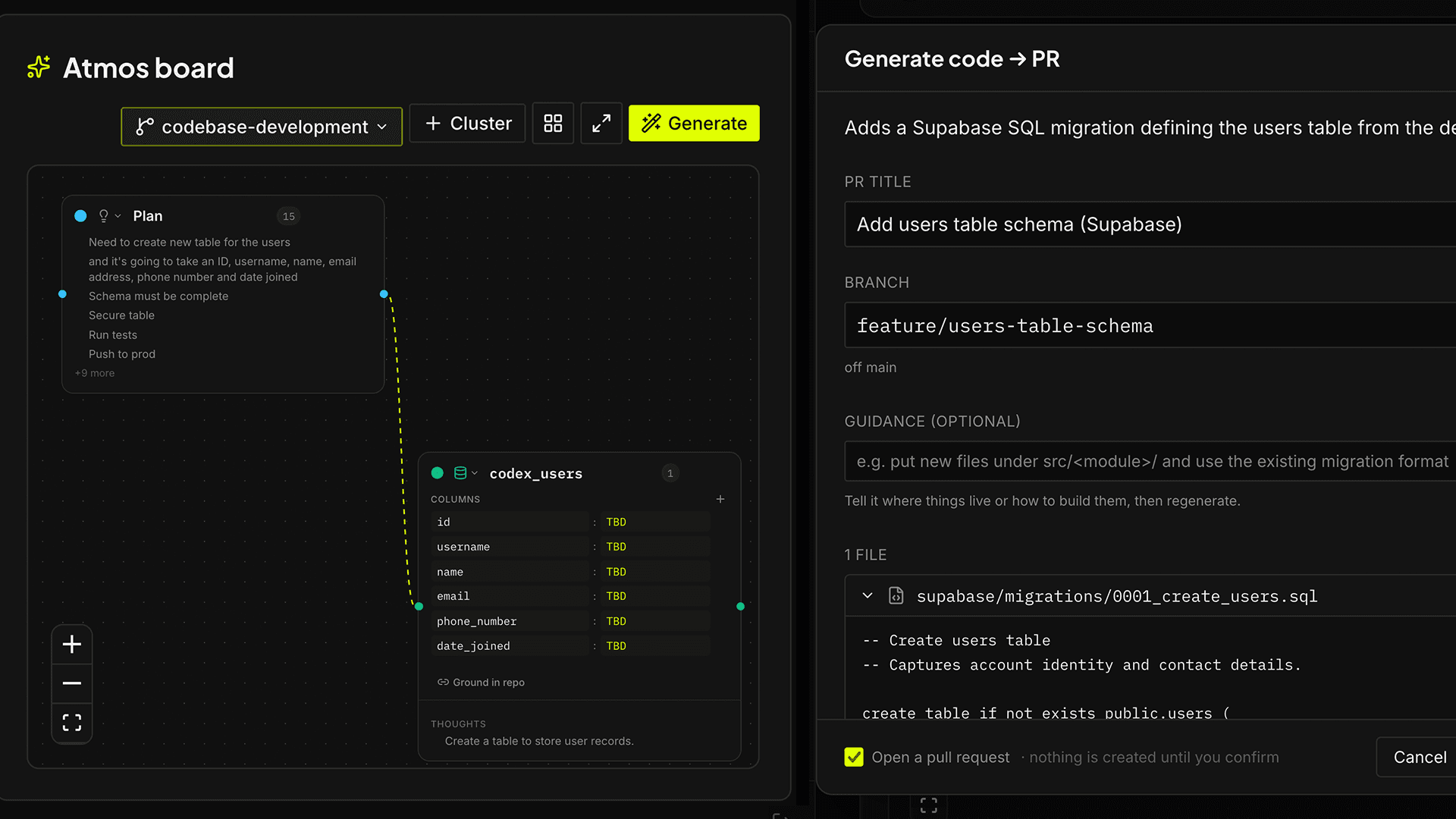
As the meeting happens, Atmos clusters the live speech stream into an editable visual board. The board can represent things like functions, database tables, endpoints, and the relationships between them. People can drag, merge, rename, recolor, pin, and link those clusters while the plan is still forming.
Connect a GitHub repository and Atmos can ground the proposed work in the actual codebase. It looks for repository instructions such as AGENTS.md, CLAUDE.md, and .cursorrules, examines the file tree, searches for relevant code, identifies existing helpers, and tries to match the project’s naming and placement conventions.
That repo awareness matters. The difference between useful generated code and expensive generated code is often whether it reuses what is already there.
Atmos then drafts a concrete change and shows the proposed branch, pull request title, description, and file contents for review. Nothing is committed at generation time. The GitHub write happens only after the user confirms, and the change goes to a branch and an ordinary pull request rather than directly to the base branch.
That gives the workflow a sane boundary. Reverbic can remove mechanical handoff work without asking the team to surrender code review.
Where the dev time actually comes back
It is tempting to judge an AI development tool by how many lines of code it writes. That is rarely the most useful measure. Reverbic targets the quieter delays around the code:
- ·Less ticket transcription: the requirements come from the source conversation
- ·Less rebriefing: the same structured context can move from the meeting to the engineer and the agent
- ·Less decision archaeology: past meetings, action items, and decisions are searchable through the product and MCP
- ·Less prompt rebuilding: Context Packs carry recurring project knowledge
- ·Less agent rework: verification flags unsupported or incomplete requirements before implementation
- ·Less repo guesswork: Atmos grounds proposals in repository instructions, structure, conventions, and existing helpers
- ·Less waiting between planning and execution: the output can land immediately in a coding tool, terminal, or PR workflow
The result is not “meetings that write perfect code.” That would be a catchy claim and a bad operating model. The real promise is more useful: meetings that preserve enough intent to make the next step faster, clearer, and easier to review.
A practical way to try it with your next dev meeting
Do not start by feeding Reverbic the biggest architecture review your company has ever held. Start with one meeting that contains a concrete build decision.
- 01Create or activate a Context Pack for the repository. Include the stack, key directories, conventions, constraints, and any agent instructions that should always travel with the work.
- 02Record the meeting or import the transcript. Let the team talk normally. The goal is to capture the real decision process, not perform for the tool.
- 03Open the Task Distiller and choose one actionable topic. Review the goal, requirements, and acceptance criteria.
- 04Check the verification results. Resolve anything that was not grounded in the transcript or that missed important project context.
- 05Export to the coding tool your team already uses, run the CLI from your terminal, let an MCP-connected agent retrieve the decision, or use Atmos to preview a repo-grounded change.
- 06Review the output like engineering work. Correct the spec before the code when possible. If Atmos proposes a PR, inspect the files and confirm only when the change matches the decision.
- 07Measure the boring things. Track how long it takes to write the ticket, brief the implementer, answer follow-up questions, locate past decisions, and get the first useful implementation into review.
That is how you find the actual time saved.
Your team is already saying the work out loud
Every standup, planning session, design review, and debugging call contains fragments of the eventual implementation. The goal is not to replace those conversations. It is to stop discarding their most valuable output.
When the meeting ends, the intent should not evaporate into a summary that nobody opens. It should leave as a grounded spec, a queryable decision, an agent-ready prompt, or a pull request the team can review.
The fastest development workflow is not the one that generates the most code. It is the one that loses the least context between the decision and the commit.
Your meeting is already the prompt. Reverbic helps you use it.
Elsewhere